
Case Study: Intranet Refresh
Overview
We have an opportunity to refresh our homepage of the intranet. The application support team is moving back end databases due to expiration dates and I saw an opportunity to use existing resources to update the homepage while the project was open.
Problem Statement
InSite currently has many major pain points that delays Wings employees in getting their work done. We believe if we redesign our intranet, we can increase employee productivity as well as provide better experiences for our members.
Users and Audience
Internal employees
New Hires
HR Training specialists
Merger and acquisition employees
Roles and responsibilities
Alex - Internal Communications and Application Support
Bee - Application Support and Troubleshoot Support
Adrienne - UI Design, Project Manager, Business Analyst, Researcher
Scope and constraints
Scope:
Clean up top navigation
Remove duplicates in the side navigation
Alphabetize headers and links
Take links out of dropdowns for ctrl+f search (since the actual search doesn’t work most times)
Delete old/non-working links
Introduce more colors from the storefront
Collaboration with SME across Wings
Constraints:
Use existing intranet platform
Use existing page template
One resource on the application support team
No project manager or business analyst
Must be launched by the end of the year
Process
Employee pain point survey
Neilson Norman Group case study
Research industry best practices
Early intranet vendor discovery
Present research and findings to stakeholders
Gain internal support
Define homepage scope
Create and present mockups
Employee communication sent
Test mockups with employees
Update mockups
Gather internal stakeholder feedback
Update mockups
Implement changes in Sharepoint
Gather employee feedback
Research Findings
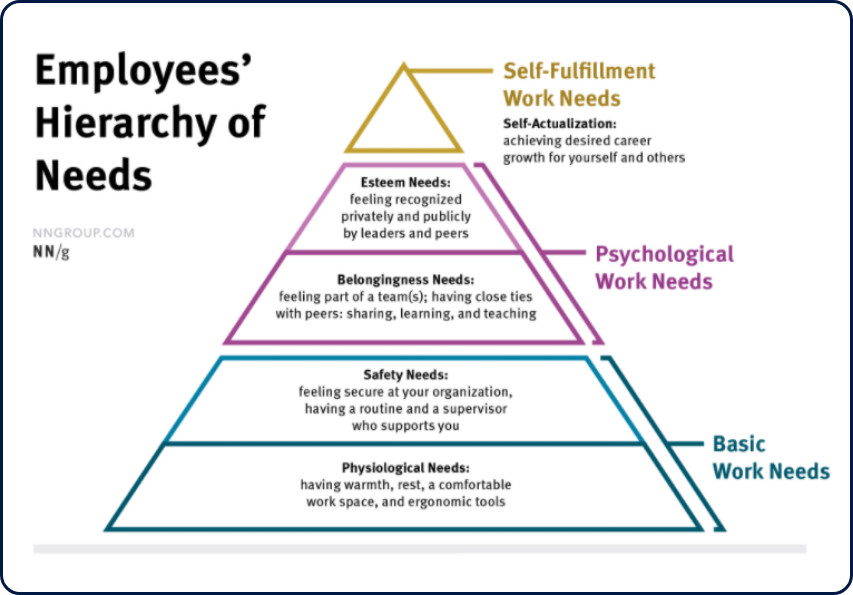
Make your intranet a safe environment with two-way participation
Use your news feed for relatable, engaging content
Results and Outcomes
We sent out a satisfaction survey to employees after launch that showed:
82% of employees found the new homepage to be a better UX than the prior design.
This refresh also shows senior management what could be improved even more in the future if they choose to focus efforts on a complete redesign.
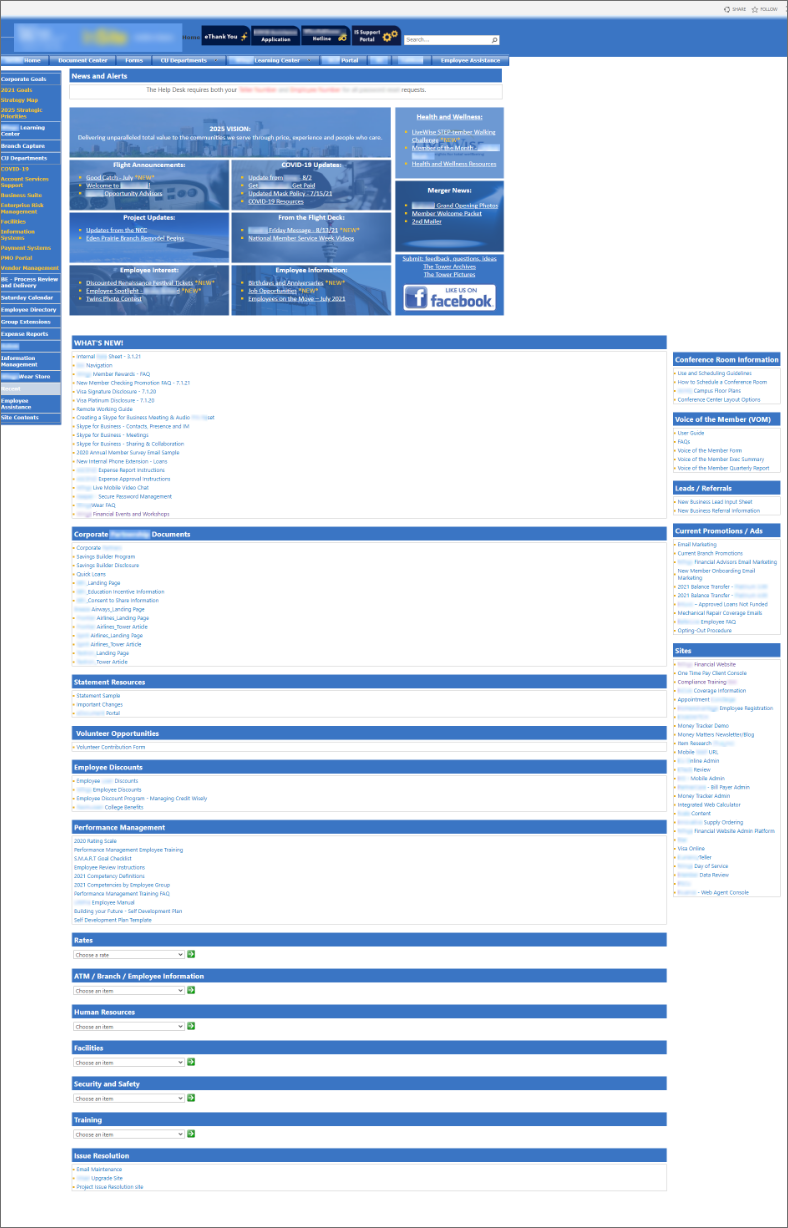
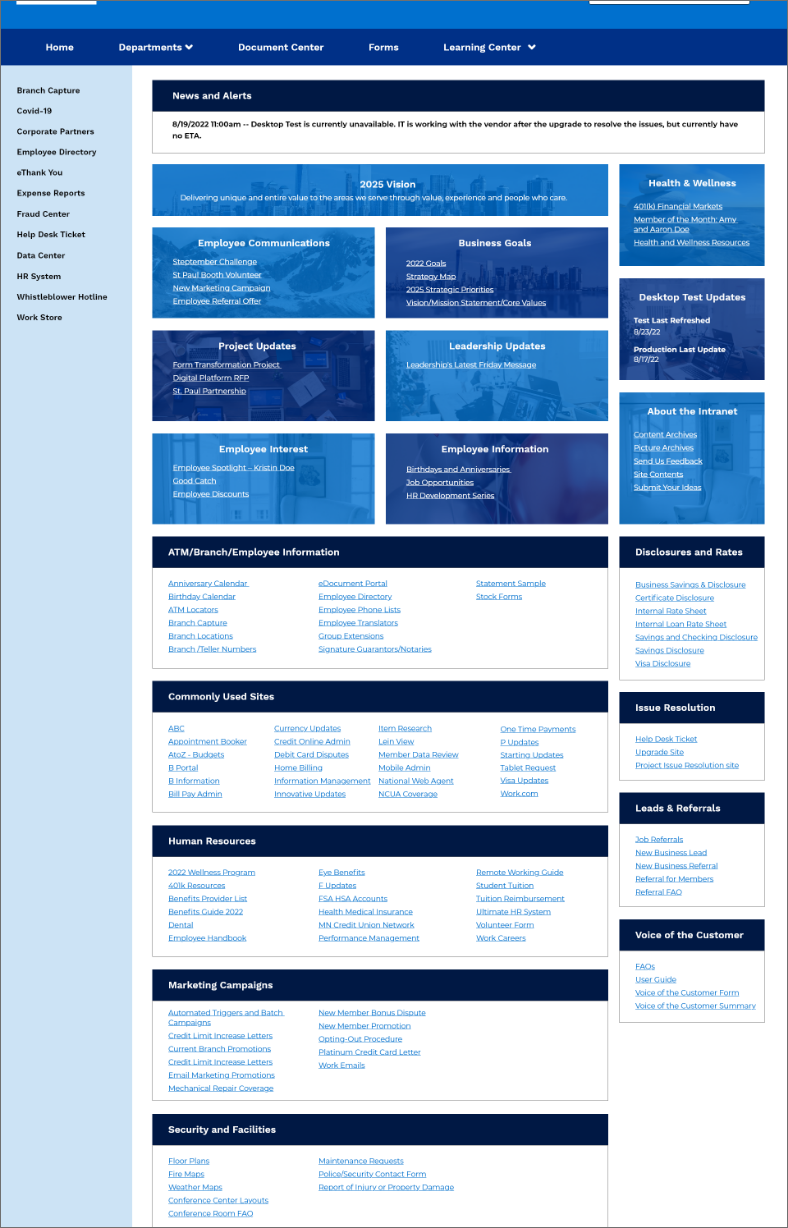
These updates are all made on employee feedback we have collected and although they don’t fix everything in InSite, it is a start.
We plan on replacing it next year which will bring about even more exciting updates.
Case Study: Carbon Footprint
Overview
During Innovation week we were encouraged to create new ideas and programs for our work.
Being in UX, every week is innovation week for me but it is fun to see other IT based teams get involved.
Problem Statement
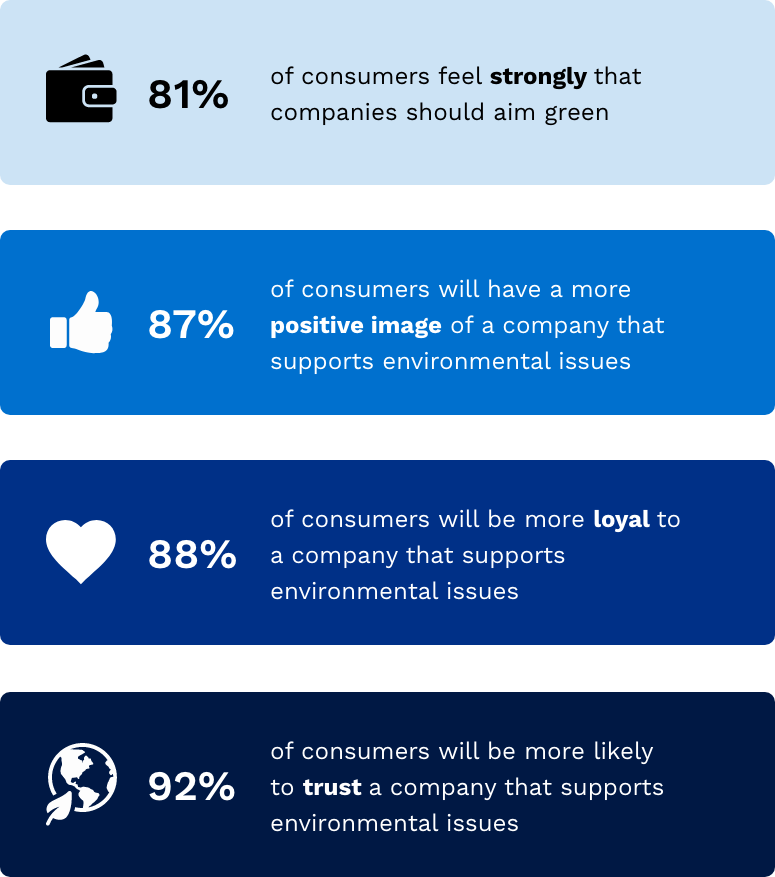
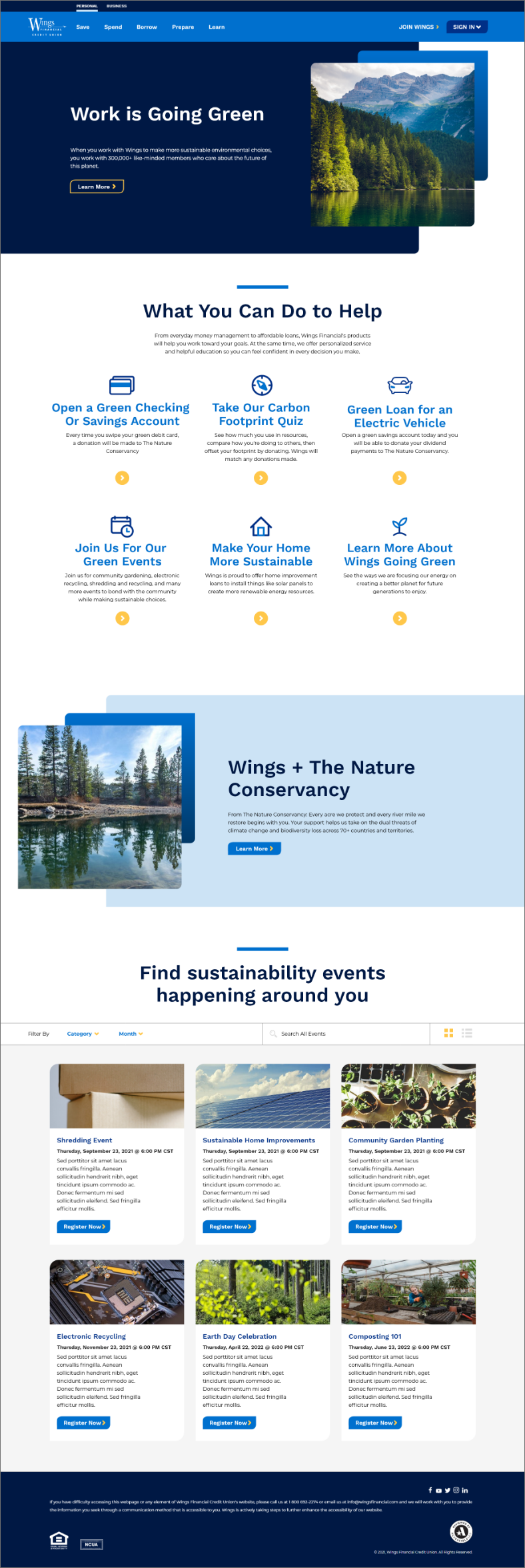
We don't currently offer any environmental related programs. This is not only personally important, but also important to our members.
The goal of this program is to create a suite of products focused on positive environmental impact.
Users and Audience
The main user is the members of this credit union. These users are environmentally focused and want a financial institution that aligns with their values.
This user would already have an existing account with us, but be curious about what perks we could offer them. For example, a discount on a loan for an electric car or solar panel instillation.
Roles and Responsibility
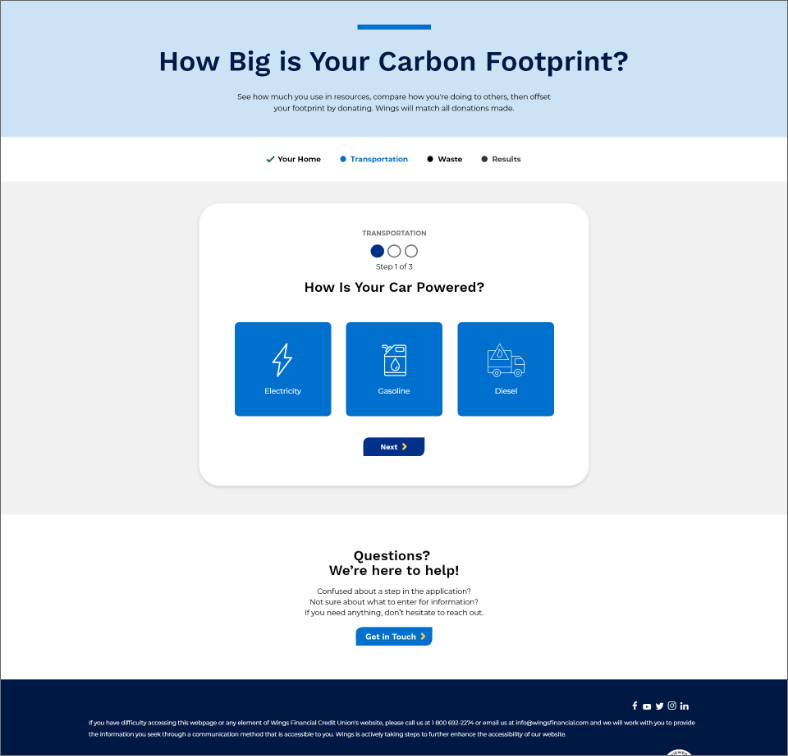
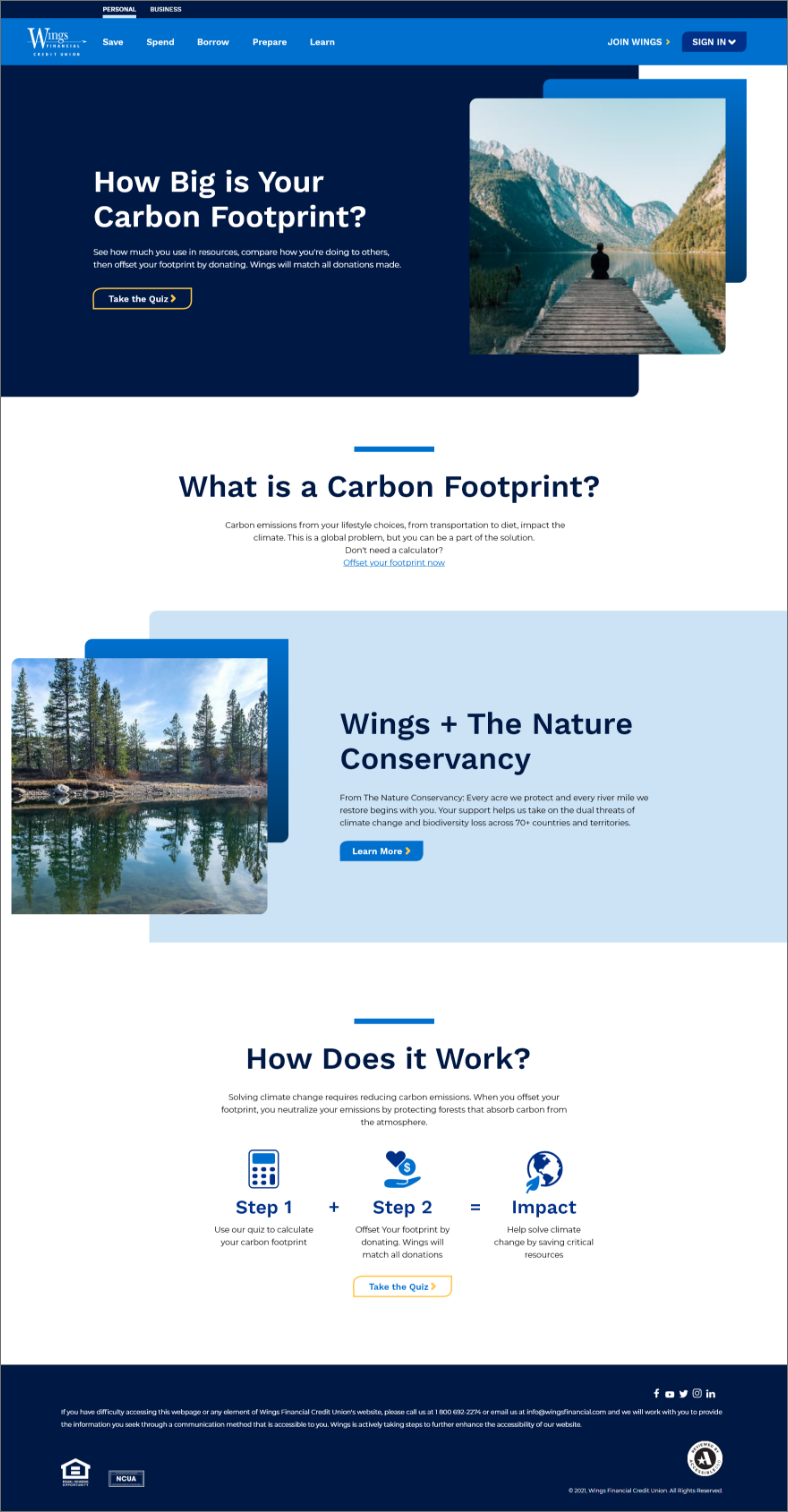
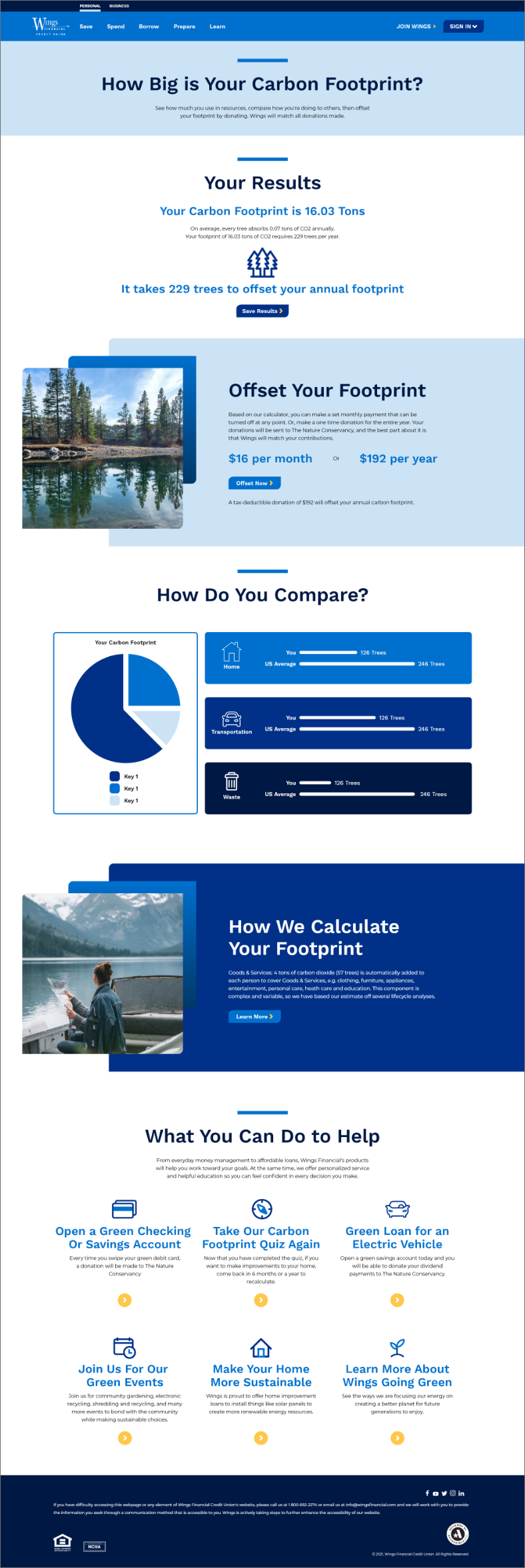
I brainstormed ideas on what type of program we wanted to create, and ultimately went with the idea of a carbon calculator and green suite of products.
There was then an opportunity to present to senior level staff and they would choose a winner. It ended up being Wings Going Green. If this idea was executed upon, next steps would be to write requirements, collect data, and other business focused tasks to make sure everything was in order.
Scope and Constraints
I had a week to create this presentation and presented to a panel. Because this was just an idea, I didn't have requirements or project sponsors to support the work, but had the opportunity to push the idea forward for the business.
Process
Brainstorm project ideas
Research statistics for business case
Define scope of design
Market analysis of financial green products
Interview internal loan team & stakeholders
Research carbon footprint calculators
Compile findings
Create potential loan products and events
Mockup ideas in prototypes
Present research and findings
Outcome and Results
This ended up as the winning project for this innovation week. Through presenting to the panel they voted my idea and presentation as the most innovative and possible for future implementation.
Case Study: Build a UX Team
Overview
I had the opportunity to promote building out a team to support the business and users from a UX perspective. A team charter, role definitions, mission statement, duties, and job descriptions were some of the ways I approached the task.
Problem Statement
My current employer needed an in house UX designer in 2018. Since then, the roadmap I created presented some gaps in resources to make the work happen. We had a problem of too much work, and not enough resources to make UX happen.
Users and Audience
Users started out as other team members in my department as well as general users of our web experiences. The main users later turned out to be members of the team I eventually added to the team.
Roles and Responsibilities
The main roles and responsibilities I had for creating a new UX team involved an HR business partner, accountant, and supervisor approval to add headcounts to the team.
Scope and Constraints
The original scope was to create an internship program and hire a candidate for the summer of 2019. The scope then expanded in 2021 to create two new roles and hire two people to fill them on the team. Constraints were mainly around budgets for salaries and candidate knowledge in the hiring process.
Process
Brainstorm team ideas
Research UX team structures
Present a need to senior management
Budget for new roles
Write job descriptions
Post job descriptions with our HR partner
Select candidates and host interviews
Make offers to final candidate selections
Create team documentation
Onboard new team members
Create new team process and best practices
Set up Jira and Confluence space for the team as a knowledge base
Outcomes and results
The results of this effort is a well-rounded UX team that consists of a UX manager, UX designer, and UX researcher. I was also able to add a seasonal UX intern to mentor and teach new designers coming into the industry.
Case Study: Accessibe
Overview
We are looking for a way to meet ADA compliance standards on our storefront website first, then will explore more internal and external facing websites options for the future.
Problem Statement
We have some errors on our internal and external facing websites that don't currently meet ADA compliance standards.
“By 2023, digital products in full WCAG Level 2 compliance will outperform their market competitors by 50%."
Why does accessibility matter?
Enhances usability
Eliminates barriers for permanent, temporary, or situational disabilities
It's the law
It's the right thing to do
Aligns with the Wings value of diversity and inclusion
Users and Audience
Main users would be our external website facing users.
Roles and Responsibilities
My roles and responsibilities for this project included:
Research for accessibility vendors and tools
Development for putting the javascript into the footer of our website
Digital marketing for working with our storefront vendor to put the javascript in the footer
Business analyst for documentation
Vendor management to select a final vendor and budget
Project management for establishing a timeline and goals
Scope and Constraints
The scope is to implement this on our public facing website before password entrance. This will allow us to see how the process goes and if it is successful on our website. One constraint is that we can’t customize legal fine print for the contract (it is what it is) and another is that it doesn’t cover our 3rd party chat bot.
Process
Market analysis for accessibility
Research vendors
Arrange vendor demos
Submit a project charter
Budget for a contract
Partner with the business units
Select a final vendor
Partner with legal and compliance
Start free trial with Accessibe
Test javascript on the marketing page
Gather feedback from internal teams
Implement changes and launch
Outcome and Results
We currently have the javascript in the footer of our marketing page and are able to see it in the stage environment. I sent out the link to business units and legal to get their overall feedback. We are not able to customize the widget much, but their feedback helps with pushing forward to signing a contract.
Next steps will be to finalize the widget and launch it to production. I've been working as the project manager and business analyst for this project, so I created a Confluence document for any documentation and steps taken in this project for when a more formalized project manager can step in, we are prepared with all of the information.
Another next step is to get Acessibe into the vendor management software with legal and set up ACH payments for their service.